
Strength
How do you share workout progress with a personal trainer?
Send a short packet with the reporting dates, completed sessions, recent comparable sets, relevant context and one question. Add a cumulative report as background, keeping it separate from the recent period. In Liftor, the progress PDF is one export option; check what it covers before asking a coach to interpret it.
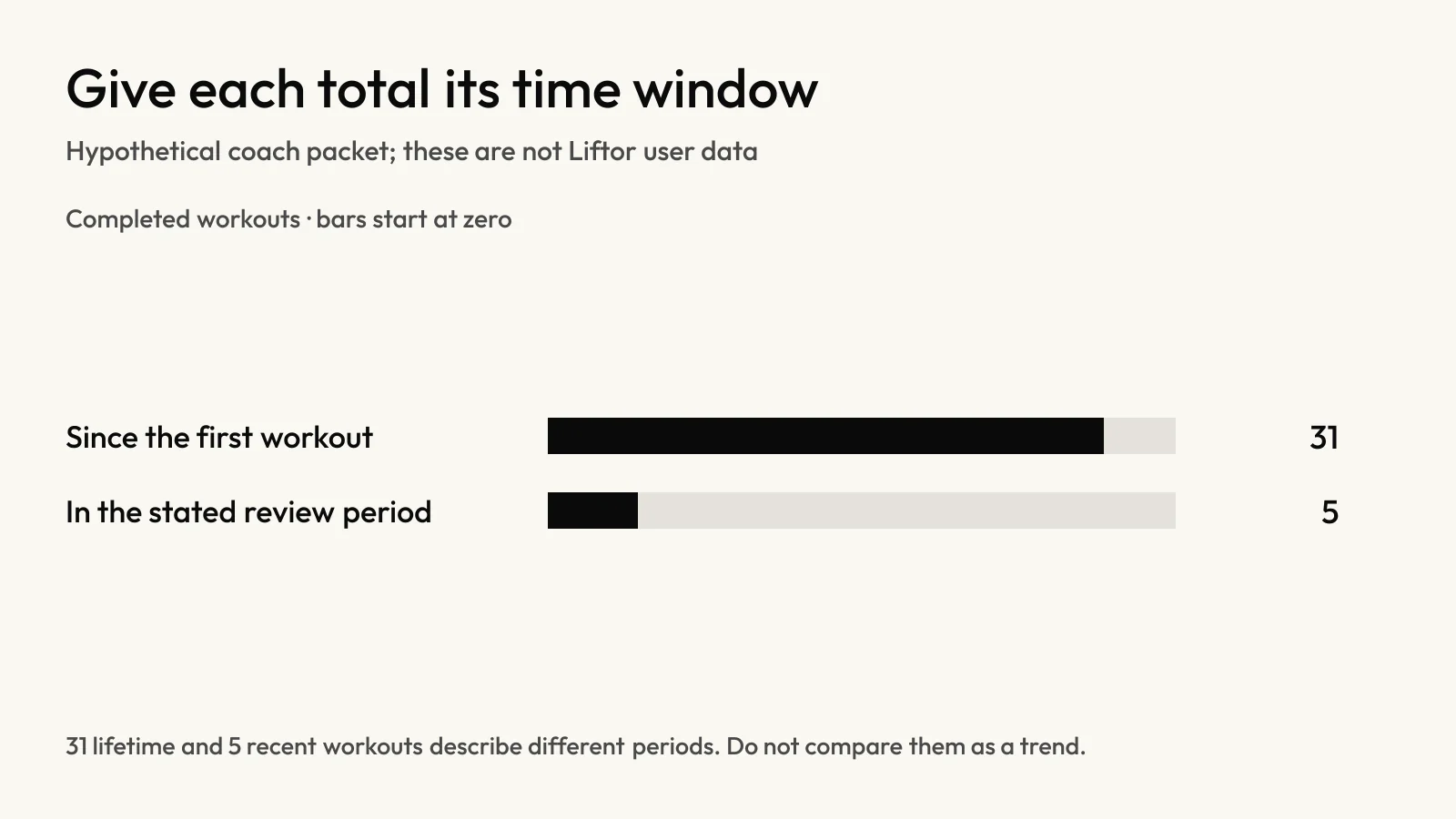
Give each total its time window
Hypothetical coach packet; these are not Liftor user data
Completed workouts · bars start at zero
- Since the first workout31
- In the stated review period5
31 lifetime and 5 recent workouts describe different periods. Do not compare them as a trend.
What should the trainer receive first?
Start with the date range and the question you want answered. Give the coach a short factual note before attaching a larger history.
| Field | Example |
|---|---|
| Review period | 1–14 October; year stated in the actual note |
| Attendance | 5 completed visits out of 6 planned |
| Recent records | The comparable exercise entries from those visits |
| Relevant change | One visit ended early because of a travel commitment |
| Question | Which accessory work should I defer when Thursday has a shorter slot? |
The facts and question above are invented to show the structure. They do not describe a Liftor user. The attendance calculation is 5 ÷ 6 × 100 = about 83%, with the planned total stated. A bare number such as “five workouts” leaves the coach without that denominator.
Keep the note within the question’s scope. A coach reviewing a shortened appointment needs the finish time and completed work. They do not automatically need your entire food history or unrelated personal information.
Which recent set details help a coach compare sessions?
Include the exercise variation, date, load convention, completed repetitions and relevant effort or setup notes. Keep comparisons on the same task where possible.
For example, record “barbell bench press, total barbell load 40 kg, three sets: 10, 9, 8” rather than “bench went badly”. Name whether a dumbbell weight is per hand. Record an equipment change rather than merging it into the same comparison.
The workout-journal article covers what to record during and after a session. For a handoff, select the relevant entries from that record and keep their dates. You do not need to rewrite every entry into a polished narrative.
Use effort ratings as reported context, with their uncertainty intact. If you were unsure about a final set, say so. The RPE and RIR guide explains the terms; a precise-looking rating cannot remove uncertainty about the original judgement.
Why does a cumulative report need a separate recent window?
A cumulative total describes the history since its starting point. It cannot by itself tell a coach what changed during the last fortnight.
Suppose a hypothetical cumulative record shows 31 completed workouts, while your 1–14 October note contains five completed visits. Those numbers cover different periods. Subtracting five from 31 gives 26 earlier visits; it does not describe a rise or fall in weekly performance.
Keep the reporting dates beside each number. If an earlier cumulative record had 26 completed visits and a later record has 31, the increase is five visits between those snapshots. To calculate attendance during that interval, you still need the planned sessions for the same interval. This is a record-keeping example, not a description of a lifetime-count field in Liftor’s PDF.
This is the distinction shown in the chart. The larger lifetime bar is not evidence that recent attendance fell. Matching the time window is a basic check before a trainer interprets a graph or a total.
How do you export progress from Liftor?
Open the Strength screen and look for the progress report’s Export PDF control when the report is available. Tap Export PDF to open the iPhone share sheet. Check the document before sending it through your intended private channel.
Liftor’s feature list includes progress among four PDF exports. The recipient can read the exported document without interpreting your account’s whole history from screenshots.
Review the contents and recipient before sending. The export gives you a document to share. If a coach has a preferred private channel or file format, agree that with them first.
When is the Liftor report available?
The report rule requires both twenty elapsed calendar days since the first workout and eight completed workouts. Reaching one threshold alone does not meet the rule.
| Elapsed days since first workout | Completed workouts | Meets both thresholds? |
|---|---|---|
| 19 | 8 | No: day threshold not met |
| 20 | 7 | No: workout threshold not met |
| 20 | 8 | Yes |
| 28 | 8 | Yes |
The first workout day counts as day zero in this calculation. The report uses a 03:00 local day boundary, so a check before then uses the previous app day. Edition windows begin twenty days after the first workout and roll every twenty-eight days. Access still requires eight completed workouts. The content remains cumulative; the edition window names the report version rather than a recent-only log.
These examples follow the app’s availability rule. They are not a reason to add workouts to reach a report sooner. If it is not available, you can still prepare the dated note and relevant recent sets on paper. The handoff method does not depend on generating a PDF.
Which report numbers need extra care?
Separate logged records from estimates, display rules and modelled comparisons. Give the trainer the underlying sets when you want to discuss recent performance.
Liftor’s score timeline uses a display rule that keeps the displayed history from falling. It therefore cannot serve as an unfiltered record of every decline in recent lifting performance. A coach needs the dated set entries to investigate those changes.
Liftor’s ranking uses a synthetic comparison population. Treat percentile or “people passed” wording as modelled context, not measured counts of actual people you outperformed. A projection also describes a model rather than a promised result.
The published Strength Score formula and one-rep-max guide explain related estimates. Keep an estimated maximum separate from a maximum you actually tested, and avoid treating the same-looking number as the same type of evidence.
Should you include sleep, effort or how you felt?
Include relevant observations with dates, keeping them separate from your explanation of why a session changed. A brief account can help the coach ask a better follow-up question.
Saw, Main and Gastin’s 2016 systematic review included 56 original studies comparing subjective wellbeing measures with objective monitoring during athlete training. It supports taking self-reported context seriously alongside other records. It does not prove that this template or a particular app improves results. Read the monitoring review.
A useful entry might say “slept less than usual; unsure of the final-set effort rating”. Keep a possible explanation, such as accumulated fatigue, labelled as something to discuss. A short note cannot diagnose a medical problem or establish the cause of a performance change.
What should you check before sharing the packet?
Check the date range, units, contents and recipient, then ask the single question you intended. Keep an unchanged copy of the underlying record so you can correct a transcription error later.
- Name the period and distinguish recent from cumulative totals.
- Check exercise names, per-hand or total-load conventions and completed sets.
- Label estimates and modelled comparisons.
- Include only relevant personal context.
- Preview the attachment and confirm the intended recipient and private channel.
- Agree what the trainer will review and when you will revisit the question.
If pain, injury or illness changed or cut short a session, say so in a dated note to the trainer. Seek a clinician’s advice about medical conditions, pain or health concerns rather than asking a progress PDF to assess them. NHS guidance also advises speaking to a GP before changing exercise after a long break or with medical concerns. A trainer handoff can organise a discussion; it cannot supply a medical assessment.
Which sources support this answer?
Liftor’s export description and its report code establish what the PDF represents. The monitoring review supports including subjective context; it does not test this handoff template or claim a product benefit.
- Liftor. Four PDF exports, including progress. Report availability, cumulative periods and export controls checked against app source on 16 October 2026.
- Saw AE, Main LC and Gastin PB (2016). Monitoring the athlete training response: subjective self-reported measures trump commonly used objective measures: a systematic review. Fifty-six original studies.
- Liftor. Published Strength Score formula and its limits.
- NHS (reviewed 22 May 2024). Physical activity guidelines for adults aged 19 to 64 and when to seek individual advice.
Topic: Training progress report. Preparing a private coach handoff with dated training records, subjective context and cumulative-report limits.
To keep a training record with a progress export, Download for iPhone.
Liftor is not a doctor and gives no medical advice.